
AI Agent Use Cases: Where Agents Actually Deliver Results
Explore the highest-impact AI agent use cases across customer support, sales, finance, IT, marketing, and HR, with real workflow patterns and adoption data.

By: Deepit Patil
Co-Founder and CTO
Published
Updated
Edited by Craze Editorial Team · See our Editorial Process
AI agents have moved past the demo stage. Over 57% of enterprise professionals now report running agents in production, and Gartner predicts 40% of enterprise applications will embed task-specific AI agents by the end of 2026. The technology works. The harder question is where to point it first.
Most lists of AI agent use cases give you 50 items and zero depth. That’s not useful when you’re deciding where to invest budget and engineering time. This guide covers the seven business functions where AI agents deliver the most measurable results, with the actual workflow patterns, adoption data, and a framework for picking your starting point.
TL;DR
- Customer support leads. Most mature use case, with 65% of queries resolved without human intervention and cost reductions of up to 68%.
- Sales, finance, and IT follow. Proven ROI timelines of 3 to 13 months across all three functions.
- Five traits define strong use cases. The work is repetitive, multi-step, cross-system, data-rich, and has clear success metrics.
- Start small. Pick one high-volume workflow, not an ambitious multi-agent platform.
- Budget $20K to $80K for a first agent deployment; expect payback within 3 to 6 months.
What Makes a Good AI Agent Use Case
Not every workflow is a good fit for an AI agent. The ones that work well share a common profile:
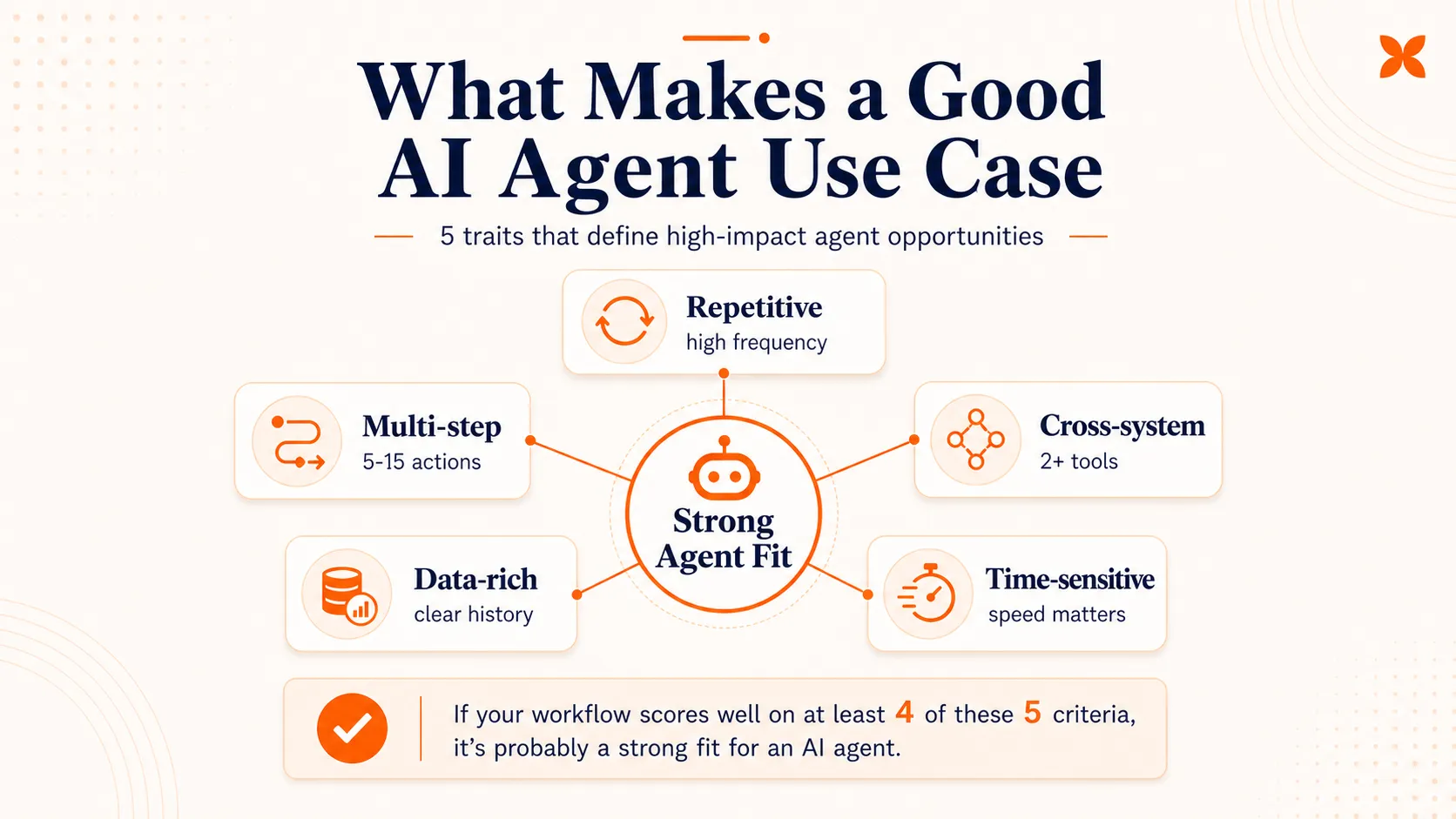
- Repetitive. The task happens hundreds or thousands of times per week in roughly the same pattern. Ticket triage, invoice processing, and lead qualification all fit this mold.
- Multi-step. The workflow involves a sequence of actions, not just a single lookup. An agent that reads a support ticket, classifies it, checks the customer’s history, and routes it to the right team is doing multi-step work that previously required a human to context-switch across tools.
- Cross-system. The task requires pulling data from or pushing data to multiple systems. CRM updates, ERP lookups, ticketing platforms, and communication tools are common integration points. Agents excel here because they don’t get fatigued by switching between six browser tabs.
- Data-rich. There’s enough historical data to define what “good” looks like. If you can’t measure the current workflow’s speed, accuracy, or cost, you’ll struggle to measure whether an agent improves it.
- Time-sensitive. Faster execution has real business value. A fraud alert that takes 30 minutes instead of 4 hours to investigate means less money lost. A support ticket resolved in 4 minutes instead of 6 hours means a happier customer.
If your candidate workflow scores well on at least four of these five criteria, it’s probably a strong fit. For background on what agents are and how they differ from simpler automation, see our guide to AI agent types .
With those criteria in mind, here are the seven business functions where agents deliver the strongest results today.
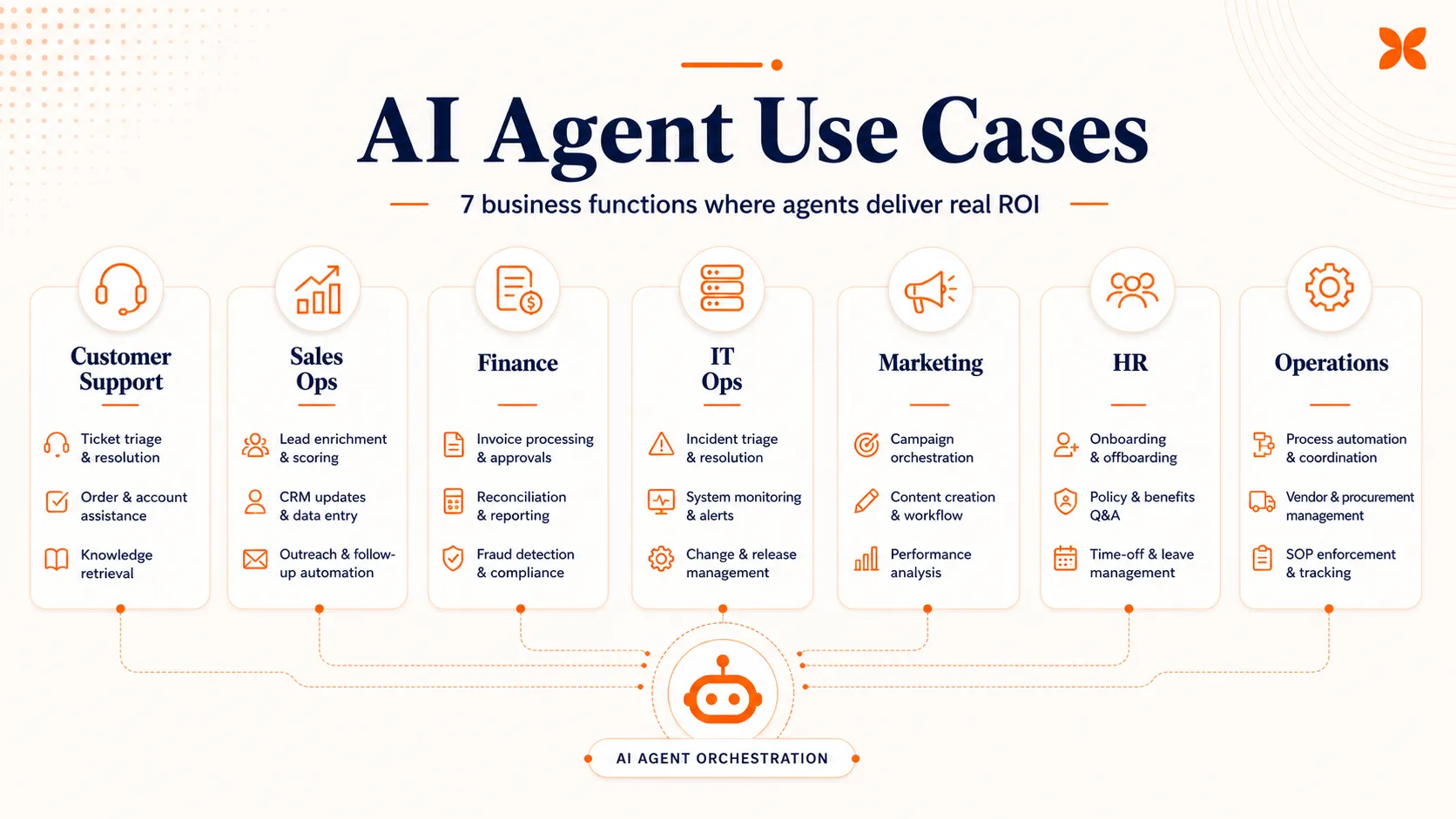
7 AI Agent Use Cases That Deliver Real Results
1. Customer Support and Service
Customer support is the most deployed and best-documented AI agent use case. It’s also where the ROI data is strongest.
Workflow. A customer submits a request (email, chat, phone, or form). The agent classifies the intent and urgency. It checks the customer’s account history, order status, or knowledge base for a resolution. If the issue matches a known pattern, the agent resolves it directly. If not, it routes the ticket to the right human team with full context attached.
Results. In 2025, 65% of incoming support queries were resolved without human intervention, up from 52% in 2023. Organizations report a 68% reduction in cost per customer interaction and 74% faster first response times within the first year of deployment. Some deployments have cut resolution times from over 30 hours to under 35 minutes.
Key sub-workflows:
- Ticket triage and routing
- Returns and refund processing
- Order status lookups
- Password resets and account changes
- Knowledge base retrieval for common questions
What makes support such a strong starting point is that the workflows are already well-documented. Most teams have runbooks, macros, or decision trees that can be directly translated into agent logic. The volume is high, the outcomes are measurable, and the cost of a wrong answer on a routine query is low.
This is also where the line between agents and chatbots matters most. A chatbot answers questions from a script. An agent reads the ticket, checks three systems, takes an action, and logs the result.
2. Sales and Revenue Operations
Sales operations is the second most common entry point, largely because the payback timeline is the shortest. SDR-focused agents show a median payback period of 3.4 months , faster than any other category.
Workflow. A new lead enters the system through a form submission, inbound email, or event registration. The agent enriches the lead record with firmographic and behavioral data. It scores the lead against qualification criteria. If qualified, the agent creates or updates the CRM record, drafts a personalized outreach sequence, and schedules follow-up tasks. If unqualified, it tags the record and moves on.
Results. Sales professionals using AI tools save an average of 2 hours and 15 minutes per day , mostly by eliminating manual data entry and CRM updates. Agents free up 8 to 12 hours per rep per week that would otherwise go to administrative work.
Key sub-workflows:
- Lead qualification and scoring
- CRM data entry and hygiene
- Meeting preparation (account history, recent interactions, open opportunities)
- Pipeline updates and forecasting inputs
- Outbound sequence personalization
Sales ops works well for agents because the data is structured, the systems are well-integrated (most CRMs have strong APIs), and the cost of a missed follow-up is directly measurable in lost revenue.
3. Finance and Compliance
Finance teams are adopting agents faster than almost any other function. As of 2026, 44% of finance teams are using agentic AI, a figure that grew over 600% from the previous year. Roughly 53% of financial institutions now run AI agents in production.
Workflow. A transaction, document, or event triggers the agent. The agent validates the data against rules, flags anomalies, and either approves the action or escalates it to a human reviewer. Every step is logged for audit purposes.
One of the biggest pain points agents address is false positives in fraud detection. Anti-financial-crime teams currently spend 27% of their time investigating alerts that turn out to be legitimate transactions. Agents can pre-screen these alerts, cross-reference multiple data sources, and surface only the cases that genuinely need human review.
Key sub-workflows:
- Invoice processing and three-way matching
- Fraud detection and transaction monitoring
- KYC (Know Your Customer) document verification
- Regulatory reporting and compliance checks
- Expense report validation
Results. KPMG reports an average 2.3x return on agentic AI investments within 13 months, with top performers achieving $8 for every $1 invested. The slower payback compared to sales (13 months vs. 3.4 months) reflects the higher compliance requirements and more cautious rollout timelines in regulated industries.
4. IT and Engineering Operations
IT operations is where agents shine at speed. The core value proposition is faster incident detection, diagnosis, and resolution, which translates directly into reduced downtime costs.
Workflow. A monitoring system fires an alert. The agent correlates the alert with recent changes, logs, and known issues. It runs diagnostic checks, identifies the probable root cause, and either applies an automated fix or presents a remediation plan to an engineer with all the context attached.
Results. Enterprise case studies show that AI-driven incident response can deliver 75% lower mean time to resolution , 80% faster investigations , and 94% root cause accuracy . In some deployments, up to 80% of IT service requests are automated entirely.
Key sub-workflows:
- Incident triage and root cause analysis
- Deployment monitoring and rollback decisions
- Infrastructure provisioning and scaling
- Code review and security scanning
- On-call alert management and escalation
For engineering teams specifically, agents are also being used for automated testing, dependency updates, and documentation generation. The architecture patterns behind these agents typically involve tool-use capabilities, where the agent can invoke CLI commands, query databases, and interact with cloud APIs.
The 40% of enterprises already using AI agents for IT service management represents one of the highest adoption rates across all business functions.
5. Content and Marketing Operations
Marketing is where agent adoption is broadest but shallowest. While 76% of marketing teams report using AI in core operations, much of that usage is still single-task (generating a draft, summarizing data) rather than true multi-step agent workflows.
Workflow. A brief or campaign trigger initiates the process. The agent generates a draft based on brand guidelines, audience data, and keyword targets. It routes the draft for review, incorporates feedback, and schedules publication. Post-publication, it monitors performance and suggests optimizations. For campaign management, the pattern is similar: the agent segments audiences, personalizes messaging, schedules sends across channels, and reports on results.
Results. Organizations using automation report 80% more leads and 77% higher conversion rates compared to manual processes. Businesses see an average return of $5.44 for every $1 spent on marketing automation.
Key sub-workflows:
- Multi-channel campaign orchestration
- Content generation and editorial workflow management
- Performance reporting and optimization recommendations
- Audience segmentation and personalization
- Social media scheduling and response management
The gap in marketing is between adoption and measurable profit impact. About 44% of leaders report efficiency gains from AI, but only 24% see measurable profit impact. That 20-point gap suggests many marketing teams are using agents for convenience rather than deploying them against workflows with clear ROI targets.
6. HR and People Operations
HR agent adoption has accelerated dramatically, climbing from 19% in 2023 to 61% in 2025 . The primary driver is the sheer volume of repetitive, process-heavy work in people operations.
Workflow. A trigger event (new hire start date, policy question, time-off request) initiates a task sequence. The agent walks through the required steps, verifies completion, and escalates exceptions. For onboarding, this means provisioning accounts, assigning training modules, scheduling orientation sessions, and confirming completion of compliance documents.
Results. Pilot deployments have shown onboarding time decreases of 60% , with new employees completing all required tasks twice as fast. One large deployment achieved 50% autonomous resolution of IT and HR support issues within the first month, with 62% of employees using the agent as their first point of contact for support questions.
Key sub-workflows:
- Employee onboarding task orchestration
- Policy and benefits question answering
- PTO and leave management
- Document generation (offer letters, contracts, verification letters)
- Internal knowledge base search and retrieval
About 35% of enterprises now deploy AI agents specifically for recruitment and onboarding. HR is a natural fit because the workflows are highly standardized, the compliance requirements create checklists that agents follow well, and the cost of slow onboarding (measured in lost productivity of new hires) is easy to quantify.
Where to Start: Picking Your First Agent Use Case
With seven business functions to choose from, the decision can feel overwhelming. Here’s a practical framework.
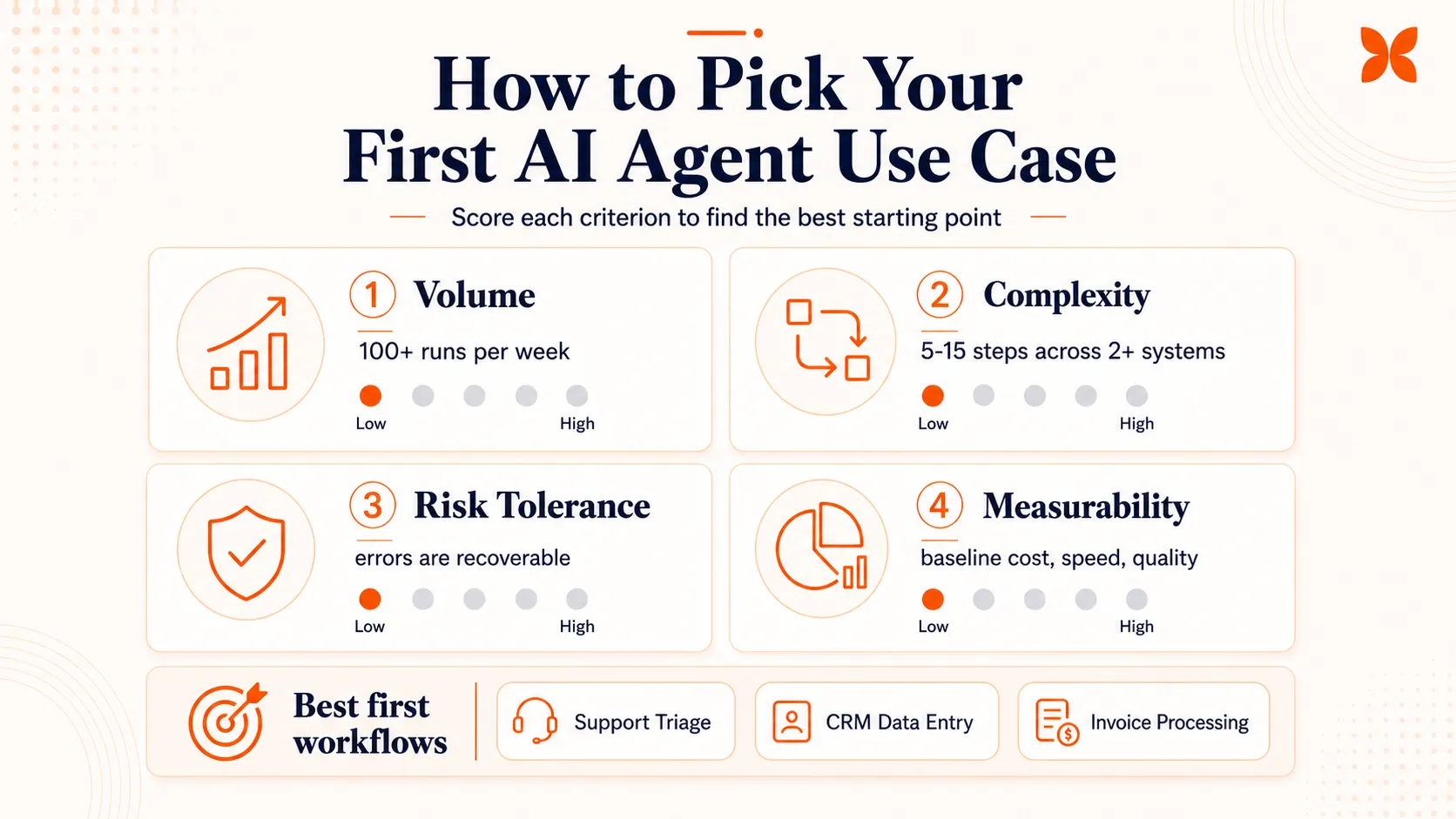
Score your candidate workflows on four dimensions:
-
Volume. How many times does this workflow execute per week? Higher volume means faster payback. Aim for workflows that run at least 100 times per week.
-
Complexity. How many steps and systems are involved? Agents add the most value in 5-to-15-step workflows that cross 2 or more systems. Single-step tasks are better handled by simple automation rules.
-
Risk tolerance. What happens if the agent makes a mistake? Start with workflows where errors are recoverable. Ticket misrouting is fixable; a wrong compliance filing is not.
-
Measurability. Can you measure the current cost, speed, and quality of the workflow? If you can’t baseline it, you can’t prove improvement.
For most organizations, the first agent should be:
- A customer support triage agent (high volume, low risk, measurable)
- A CRM data entry agent (high volume, low risk, clear time savings)
- An invoice processing agent (medium volume, medium risk, strong ROI data)
Budget realistically. A first agent deployment for a single workflow typically costs $20,000 to $80,000, with ongoing costs of $2,000 to $10,000 per month. More complex multi-system agents can run $150,000 to $400,000 or more. The median time to positive ROI across all categories is 5.1 months .
Start with one workflow, not a platform. The most successful deployments begin with a single, well-scoped use case and expand after proving value. Platforms like Craze can help you build that first workflow and scale from there, but the critical step is choosing the right starting point, not the right tool.
If you want to go deeper on implementation, our guides to building an AI agent and AI agent builders cover the technical side. For framework comparisons, see our agentic AI frameworks overview. And if you want to see specific agent implementations in action, check out our list of AI agent examples .
Conclusion
The best AI agent use cases aren’t glamorous. They’re the repetitive, multi-step, cross-system workflows that eat up hours of human time every week. Customer support, sales operations, finance, IT, marketing, and HR all have proven agent applications with real ROI data behind them.
The organizations seeing the strongest returns aren’t the ones deploying agents everywhere at once. They’re the ones that pick one high-volume workflow, measure the baseline, deploy an agent, and expand from there. Start boring. Scale what works.
FAQs
What is the most common AI agent use case?
Customer support is the most mature and widely deployed AI agent use case. Agents handle ticket triage, common issue resolution, and multi-step processes like returns and refunds. It is the most common starting point because support workflows are repetitive, well-documented, and easy to measure.
How do I choose my first AI agent use case?
Start with workflows that are repetitive, multi-step, cross-system, and have clear success criteria. Customer support ticket handling, CRM data entry, and invoice processing are common first choices because they have high volume, measurable outcomes, and low risk if the agent makes an error.
Can AI agents replace human workers?
AI agents automate specific tasks within workflows, not entire jobs. In customer support, agents handle routine tickets while humans focus on complex and sensitive cases. The pattern across most use cases is augmentation: agents handle the repetitive work, and humans handle judgment calls, exceptions, and relationship management.
What industries benefit most from AI agents?
Financial services, customer support, IT operations, and marketing see the strongest early returns. These industries have high volumes of repetitive, data-rich tasks that agents can handle reliably. Healthcare, legal, and supply chain are growing areas, but regulatory requirements and accuracy demands make adoption slower.
How much do AI agents cost to deploy?
Costs vary widely by use case complexity. A single-workflow agent for ticket triage or data entry might cost $20K to $80K to deploy. Multi-system agents handling complex workflows like compliance monitoring or revenue operations can run $150K to $400K or more, with monthly operational costs of $3,000 to $13,000.
More Articles
AI Agent Orchestration: What It Is and Why It Matters

AI agent orchestration coordinates multiple specialized agents to handle complex tasks no single agent can. Learn the patterns, building blocks, failure modes, and how to get started.
AI Agent vs Chatbot: How They Actually Differ
AI agents and chatbots are not the same thing. Learn the real differences in how they work, what they cost, and which one your team actually needs.
Agentic AI Frameworks: How to Choose the Right One
Compare the top agentic AI frameworks by orchestration style, production readiness, and team fit. Practical decision guide for LangGraph, CrewAI, and more.


